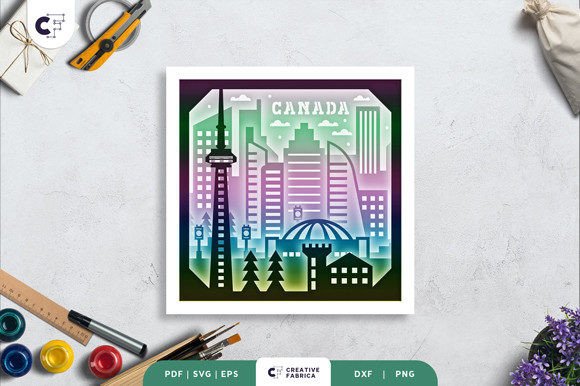
Discover the Beauty of the Canada Skyline 3D Shadow Box
The Canada Skyline 3D Shadow Box is a stunning craft project that brings the iconic silhouette of Canada's major cities to life. This layered paper cutting template offers an engaging and creative way for crafters of all skill levels to create a beautiful piece of art. Whether you're looking to decorate your home or make a thoughtful gift, this 3D shadow box is a versatile and meaningful project that combines creativity with practicality.
What Is the Canada Skyline 3D Shadow Box?
The Canada Skyline 3D Shadow Box is a multi-layered paper craft designed to showcase the skyline of Canadian cities in a three-dimensional format. It features eight distinct layers that, when assembled, create a realistic and visually striking representation of a cityscape. The design includes intricate details such as buildings, bridges, and other architectural elements, making it ideal for those who appreciate both art and craftsmanship.
This project is perfect for anyone interested in DIY crafts, especially those who enjoy working with paper, cutting, and assembling designs. The template is available in multiple file formats, including SVG, PDF, EPS, PNG, and DXF, ensuring compatibility with a wide range of cutting machines and tools.
Key Features of the Canada Skyline 3D Shadow Box
- 8 Layers: The design is composed of eight separate layers, each contributing to the depth and dimension of the final product.
- Size: Each layer measures 20.32 x 20.32 cm, providing ample space for detailed work while remaining manageable for most crafters.
- Multiple File Formats: The template is available in SVG, PDF, EPS, PNG, and DXF, allowing for flexibility in how you use and customize the design.
- Cutting Compatibility: The SVG file can be used with Silhouette, Cricut, and other cutting machines, making it easy to cut the design precisely.
- Manual Option: If you don't have a cutting machine, you can still complete the project using an art knife or scissors.
- Assembly Tools: Glue or double-sided tape is required to put the layers together and create the 3D effect.
How to Use the Canada Skyline 3D Shadow Box Template
Using the Canada Skyline 3D Shadow Box template is straightforward, whether you're a beginner or an experienced crafter. Start by choosing the file format that works best for your tools. If you have a cutting machine like a Cricut or Silhouette, load the SVG file and cut out each layer according to the instructions. For those without a machine, print the design on cardstock and carefully cut along the lines with an art knife or scissors.
Once all the layers are cut, assemble them one by one, ensuring they align correctly. Use glue or double-sided tape to secure each layer in place. The result is a 3D shadow box that can be displayed as a framed wall decoration or enhanced with LED strips to create a glowing light box effect.
Customization and Personalization
The Canada Skyline 3D Shadow Box offers numerous opportunities for customization. You can choose different colors of cardstock to match your personal style or the theme of the space where it will be displayed. Additionally, the SVG file can be resized while maintaining the same aspect ratio, allowing you to create larger or smaller versions of the design depending on your needs.
Some crafters also enjoy adding additional elements, such as small lights, miniature figures, or background textures, to enhance the visual appeal of their shadow box. These personal touches can make the project even more unique and meaningful.
The Purpose and Significance of the Canada Skyline 3D Shadow Box
The Canada Skyline 3D Shadow Box serves multiple purposes, from being a decorative piece to a meaningful gift. Its primary function is to provide a visually appealing and artistic representation of a Canadian cityscape. However, it also has deeper significance for those who create and display it.
For many, this project is a way to celebrate Canadian culture and architecture. By creating a 3D shadow box of a famous city, such as Toronto, Vancouver, or Montreal, crafters can express pride in their heritage or share a piece of Canada with others. It’s also a great way to commemorate a special event, such as a move to a new city or a visit to a Canadian landmark.
In addition to its cultural value, the Canada Skyline 3D Shadow Box is a valuable educational tool. It introduces users to the principles of 3D design, layering, and spatial arrangement. For students or hobbyists interested in graphic design, engineering, or architecture, this project can serve as a hands-on learning experience that combines creativity with technical skills.
Practical Relevance in Modern Life
The Canada Skyline 3D Shadow Box is not just a craft project—it’s a reflection of modern creativity and technology. In today’s world, where digital tools are widely used in design and manufacturing, this project demonstrates how traditional crafts can be enhanced with modern techniques. The availability of SVG files allows for precise cutting, making it easier than ever to create high-quality paper art at home.
Moreover, the project aligns with current trends in DIY and handmade goods. As more people seek unique, personalized items, the Canada Skyline 3D Shadow Box offers a way to create something special that stands out from mass-produced decorations. It’s also a great option for those looking to engage in low-cost, eco-friendly crafting, as it uses paper and simple materials that are both sustainable and affordable.
Common Misconceptions and Clarifications
There are a few common misunderstandings about the Canada Skyline 3D Shadow Box that are worth addressing. One of the most frequent questions is whether the template is suitable for beginners. While some parts of the project may require careful cutting and assembly, the overall process is straightforward and well-suited for those new to paper crafts.
Another misconception is that the final product must look exactly like the preview image. While the design is based on a specific cityscape, the actual appearance can vary depending on the materials used, lighting conditions, and personal choices in color and layout. This flexibility allows for a wide range of creative interpretations.
Some users may also wonder if the project requires advanced tools or expensive equipment. However, the Canada Skyline 3D Shadow Box can be completed with basic supplies, making it accessible to a broad audience. Even those without a cutting machine can enjoy the process by using manual cutting techniques.
Why Choose the Canada Skyline 3D Shadow Box?
The Canada Skyline 3D Shadow Box is more than just a craft project—it’s a creative journey that combines art, technology, and personal expression. Whether you’re looking to decorate your home, create a unique gift, or explore the world of paper crafts, this project offers something for everyone.
With its detailed design, multiple file formats, and user-friendly assembly process, the Canada Skyline 3D Shadow Box is an excellent choice for crafters of all skill levels. It’s also a great way to connect with Canadian culture and express your creativity in a meaningful way.
If you're ready to bring the beauty of Canada's skyline to life, download the Canada Skyline 3D Shadow Box template today and start creating your own masterpiece. With a little time and effort, you’ll have a stunning piece of art that you can proudly display or give as a thoughtful gift.