Sliced Apple 3D Papercraft: A Creative and Educational Project for All
Creating a sliced apple 3D papercraft is more than just a fun activity—it's a blend of art, technology, and practical application. Whether you're a teacher looking for engaging classroom decor, a party planner searching for unique centerpieces, or a hobbyist eager to explore papercraft, this design offers something for everyone. With its precise measurements and detailed instructions, the sliced apple papercraft is an ideal project that combines creativity with technical skill.
Understanding the Sliced Apple 3D Papercraft Design
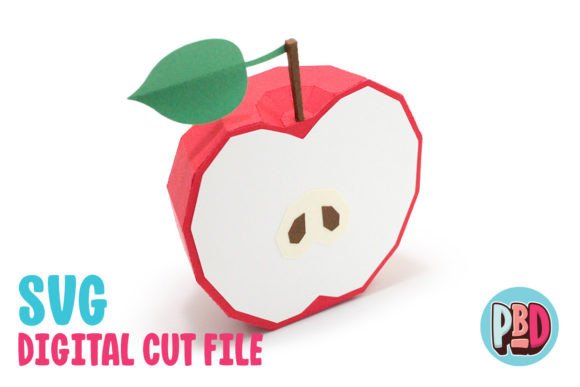
The sliced apple 3D papercraft is a digital design that can be printed and assembled into a realistic three-dimensional model of a sliced apple. This design is specifically crafted for use with medium cardstock, ensuring durability and a professional finish. The finished product measures 3.5 inches in width, 2 inches in depth, and 4.5 inches in height—making it a compact yet impressive addition to any space.
This papercraft is not just about aesthetics; it also serves as a practical tool for learning. For students, it can be used to teach geometry, spatial reasoning, and basic design principles. For educators, it provides a hands-on way to engage students in STEM (Science, Technology, Engineering, and Math) activities. The process of assembling the papercraft encourages problem-solving, attention to detail, and patience—skills that are valuable in both academic and real-world settings.
How to Use the Sliced Apple Papercraft
The sliced apple 3D papercraft comes with a downloadable ZIP file containing essential files for construction. Inside the ZIP, you'll find:
- SVG Cut File: Ideal for use with Silhouette Designer Edition and above, or Cricut Design Space. These files allow for precise cutting using digital cutting machines.
- DXF Cut File: Compatible with Silhouette Basic Edition. While DXF files can be used, they may require additional setup to ensure proper alignment and clarity.
- PDF Instructions: A comprehensive guide that includes all necessary steps for assembly, along with a full material list.
Before starting, make sure to extract all files from the ZIP archive. It's important to note that SVG files are generally easier to work with in most software platforms, while DXF files may need specific settings adjusted in Silhouette Studio for optimal performance.
Setting Up Your Software for the Best Results
If you're using the DXF cut file, you'll need to adjust your preferences in Silhouette Studio to ensure the file loads correctly. Follow these steps:
- Open Silhouette Studio and go to Edit Preferences.
- Select Import DXF.
- Change the setting from As-is to Centered.
Keep in mind that DXF files may open more slowly and appear less clean compared to SVG files. If possible, opt for the SVG cut file for a smoother experience.
The Versatility of the Sliced Apple Papercraft
The sliced apple 3D papercraft is incredibly versatile, making it suitable for a wide range of applications. Here are some popular uses:
- Classroom Decor: Teachers can use this papercraft to create interactive learning tools or eye-catching decorations that spark student interest.
- Parties and Events: From birthday celebrations to food-themed events, the sliced apple makes a charming centerpiece or table decoration.
- Art Projects: Artists and crafters can incorporate this design into larger installations or display it as a standalone piece.
- Gifts and Keepsakes: Personalize the papercraft with names, dates, or messages to create a meaningful gift.
Its small size and detailed design make it perfect for both individual and group projects. Whether you're working alone or collaborating with others, the sliced apple papercraft offers a rewarding creative experience.
Why Choose Medium Cardstock?
The design specifies the use of medium cardstock for the best results. This type of paper is thicker than regular printer paper but thinner than heavy-weight cardstock, providing the right balance of strength and flexibility. It allows for crisp cuts and maintains the structure of the papercraft without being too rigid.
Using the correct material is crucial for achieving a high-quality finish. If you're unsure about the type of cardstock to use, check the PDF instructions included in the download for recommendations. Some users may choose to experiment with different materials, but sticking to the suggested specifications ensures the most accurate and durable outcome.
Common Misconceptions About Papercraft
Despite its growing popularity, there are still some misunderstandings about papercraft. One common assumption is that it requires advanced skills or expensive equipment. In reality, the sliced apple 3D papercraft is designed to be accessible to beginners, with clear instructions and straightforward assembly.
Another misconception is that papercraft is only for children. However, this design appeals to people of all ages, including adults who enjoy the challenge of creating intricate models. It's also a great way to introduce younger generations to the joys of hands-on creativity.
Some users may also assume that digital cut files are difficult to work with. While there is a learning curve, especially when dealing with DXF files, the process becomes much simpler once you understand the necessary settings and tools. The SVG files, in particular, are user-friendly and compatible with many popular design software programs.
How the Sliced Apple Fits Into Modern Life
In today’s fast-paced world, finding time for creative hobbies can be challenging. However, the sliced apple 3D papercraft offers a convenient and fulfilling way to engage in creative expression. It can be completed in a short amount of time, making it ideal for busy individuals who want to enjoy the benefits of crafting without investing excessive hours.
Additionally, this papercraft aligns with current trends in digital design and DIY culture. As more people turn to online resources for inspiration and materials, projects like this become increasingly valuable. They promote self-sufficiency, reduce reliance on mass-produced items, and encourage personalization and innovation.
Conclusion
The sliced apple 3D papercraft is more than just a decorative item—it's a versatile, educational, and enjoyable project that can be adapted to various needs and interests. Whether you're using it for classroom purposes, event planning, or personal enjoyment, this design offers a unique blend of creativity and functionality. With the right tools, materials, and instructions, anyone can bring this beautiful papercraft to life.
By understanding the design, its purpose, and how to use it effectively, you can unlock new possibilities for artistic expression and practical application. So why not give it a try? You might just discover a new passion for papercraft and the joy of creating something truly special with your own hands.